
Are you dreaming of a kitchen makeover but worried about the costs? What if you could design your kitchen layout online for free, without hiring an expensive professional?
Imagine having the power to plan your perfect kitchen from the comfort of your couch, all while saving money and ensuring it suits your style and needs. You’ll discover easy-to-use tools and tips that can help you visualize your kitchen transformation in no time.
By the end, you’ll feel confident and excited, ready to turn your dream kitchen into a reality without spending a dime on design services. So, are you ready to unlock the secrets to designing a kitchen layout online for free? Let’s dive in!
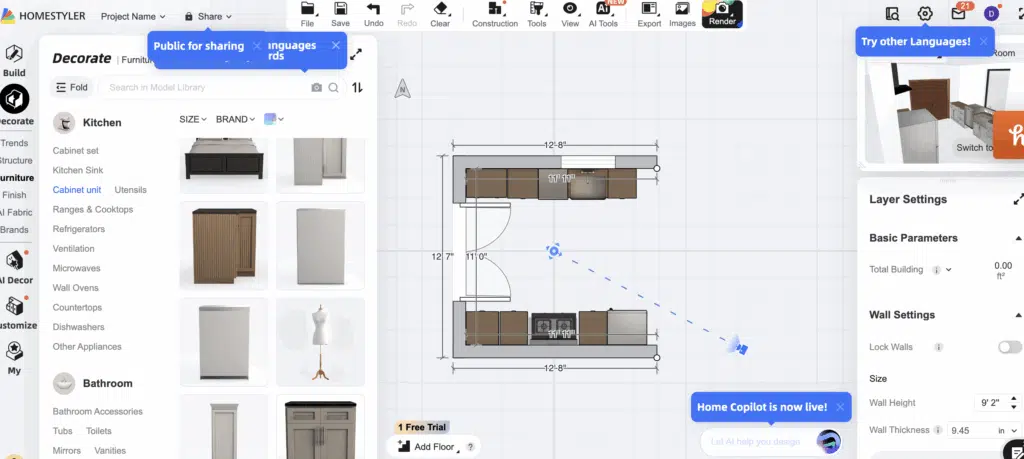
Credit: www.spacesbydee.com
Choosing The Right Online Tools
Designing a kitchen layout online offers flexibility and creativity. Choosing the right tools is crucial. Free online platforms make this task accessible and convenient. Explore top platforms and essential features for successful kitchen design.
Top Free Design Platforms
Numerous platforms offer free kitchen design tools. Some popular options include:
- SketchUp Free:Known for its user-friendly interface, perfect for beginners.
- RoomSketcher:Offers 3D visualization, aiding in better understanding of space.
- IKEA Kitchen Planner:Ideal for designing with IKEA products.
- HomeByMe:Provides detailed designs and realistic renderings.
Features To Look For
Choosing the right tool depends on its features. Look for:
- Ease of Use:Simple navigation and intuitive design enhance user experience.
- Customization Options:Allows personalization of every detail.
- 3D Visualization:Helps visualize the final layout effectively.
- Product Integration:Seamless addition of real products enriches design accuracy.
These features make online kitchen design efficient and enjoyable.
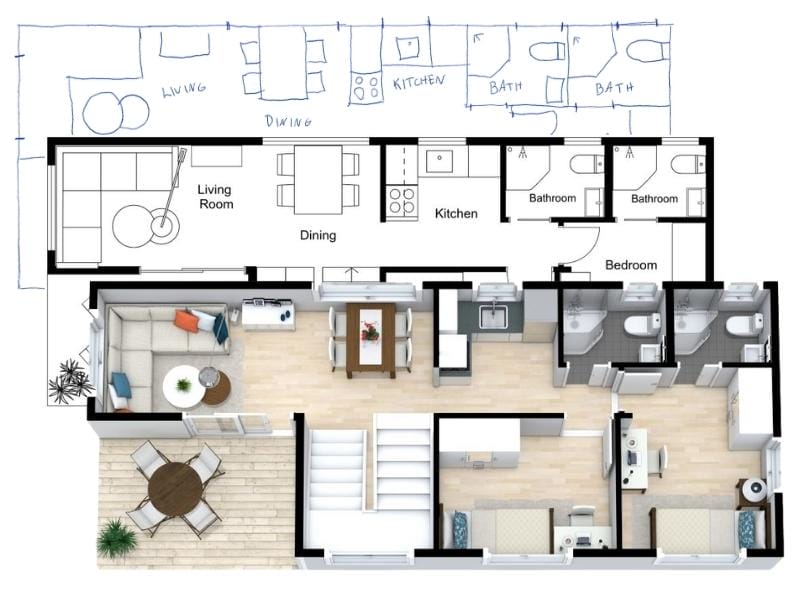
Credit: www.roomsketcher.com
Understanding Kitchen Layouts
Designing a kitchen layout online for free is simple with intuitive tools. Explore various options and visualize your space effectively. Tailor the design to suit your needs and maximize functionality.
Understanding kitchen layouts is essential when designing a functional cooking space. A well-planned kitchen layout ensures ease of movement and efficient workflow. Knowing different layout types helps make informed decisions.Common Layout Types
Several kitchen layouts are popular in home design. Each layout suits different space sizes and family needs.- One-Wall Kitchen:All appliances and cabinets align on a single wall.
- Galley Kitchen:Two parallel walls with a walkway in between.
- L-Shaped Kitchen:Cabinets form an L along two walls.
- U-Shaped Kitchen:Cabinets cover three walls, creating a U shape.
- Island Kitchen:Adds a freestanding island for extra workspace.
- Peninsula Kitchen:Similar to an island but connected to a wall.
Pros And Cons Of Each Layout
Each kitchen layout has unique benefits and drawbacks. Understanding these can guide you in choosing the best fit.- One-Wall Kitchen:
- Pros: Ideal for small spaces, keeps everything within reach.
- Cons: Limited counter space, lacks work triangle efficiency.
- Galley Kitchen:
- Pros: Efficient workflow, uses space wisely.
- Cons: Can feel cramped, not suitable for large gatherings.
- L-Shaped Kitchen:
- Pros: Flexible, open layout, accommodates dining area.
- Cons: Corner storage can be tricky, requires ample wall space.
- U-Shaped Kitchen:
- Pros: Plenty of storage and counter space, good for multiple cooks.
- Cons: May feel enclosed, needs ample room.
- Island Kitchen:
- Pros: Extra workspace, great for socializing.
- Cons: Requires large space, can disrupt workflow.
- Peninsula Kitchen:
- Pros: Additional counter space, integrates well with other areas.
- Cons: Limits traffic flow, may feel crowded.
Measuring Your Space
Begin by measuring your kitchen space accurately. Use free online tools to create an efficient layout. Tailor the design to fit your cooking habits and storage needs.
Measuring your space is crucial in designing a kitchen layout online. Accurate measurements ensure that your virtual design matches the physical space. This step sets the foundation for your entire kitchen plan.Tools For Accurate Measurements
Use a tape measure for precise length and width readings. A laser measure can provide quick and accurate results. Digital apps can help record dimensions and create sketches. Graph paper lets you draw a scaled version of your kitchen.Tips For Measuring Kitchen Dimensions
Measure each wall individually, noting the lengths in inches. Include doorways and windows in your measurements. Record the height from floor to ceiling. Check for any irregularities in the wall shape. Ensure to measure fixed features like cabinets and appliances.
Credit: www.lowes.com
Creating A Virtual Floor Plan
Creating a virtual floor plan for your kitchen is an exciting task. It allows you to visualize your ideas without spending money. Many free online tools can help you design your dream kitchen. You can rearrange layouts, add or remove elements, and see the results instantly. This process is perfect for those wanting to explore different styles and functionalities.
Step-by-step Design Process
Begin by selecting an online tool that fits your needs. Most tools require a simple sign-up. Input the dimensions of your kitchen space carefully. Use the drag-and-drop feature to place walls and windows. Adjust sizes to match real-life measurements. Once the structure is ready, start arranging the main elements. Experiment with different layouts. Try placing islands, cabinets, and countertops in various positions. Save your work regularly to avoid losing progress.
Incorporating Appliances And Fixtures
Appliances play a crucial role in kitchen design. Choose where to place your refrigerator, stove, and sink. Ensure there’s enough space around each appliance. This makes cooking and cleaning easier. Consider the flow of movement in your kitchen. Avoid placing appliances too close to each other. Add fixtures like lighting and faucets next. These enhance the kitchen’s look and functionality. Adjust the layout if necessary to fit everything perfectly.
Optimizing Workflow
Designing a kitchen layout online for free can greatly improve workflow. Utilize easy-to-use tools to visualize your space. Experiment with different configurations to find the best fit.
Optimizing the workflow in your kitchen layout is crucial for creating an efficient and enjoyable cooking space. By strategically organizing elements, you can save time and effort, making meal prep a breeze. An optimized kitchen layout can transform your culinary experience, allowing you to focus more on creativity and less on chaos.The Work Triangle Concept
The work triangle is a fundamental design principle that enhances kitchen efficiency. It connects the three main work areas: the stove, the sink, and the refrigerator. Ideally, these should form a triangle, minimizing unnecessary movement. Imagine preparing a meal without crisscrossing the kitchen countless times. A well-planned work triangle reduces steps between these key areas, saving precious time. When designing online, visualize this layout to ensure smooth workflow.Placement Of Key Kitchen Elements
The placement of kitchen elements can make or break your cooking experience. Position your stove, sink, and refrigerator with accessibility in mind. These elements should be the focal points of your kitchen design. Consider the frequency of use for each element. The sink, often used for washing and prepping, should be centrally located. The stove, where most cooking happens, needs easy access to both the sink and refrigerator. This strategic placement ensures a seamless and enjoyable cooking process. As you design your kitchen layout online, picture yourself moving through each task. What placement would make chopping, washing, and cooking most efficient for you? By focusing on these aspects, you can create a kitchen that truly works for you.Customizing Your Design
Design your kitchen layout online for free to create a personalized space. Use easy-to-navigate tools to arrange cabinets, appliances, and more, adapting the design to your preferences. Explore different styles and configurations effortlessly.
Customizing your kitchen design online can be a thrilling adventure. It allows you to infuse your personality into the space where you create culinary masterpieces. Whether you’re reimagining your current kitchen or planning a new one, the process of customization makes it uniquely yours. Let’s dive into how you can choose colors, materials, and add personal touches that reflect your style and functionality needs.Choosing Colors And Materials
Imagine a kitchen that mirrors your favorite color palette. Online tools often offer a rich array of hues to experiment with. Picture soft blues for a calming effect or vibrant reds to ignite energy. Don’t hesitate to mix shades for contrast and depth. Materials are equally important. Consider sleek stainless steel for a modern touch or rich wood for warmth. Each material brings a different vibe, so explore combinations that work with your lifestyle. Would a marble countertop be a luxurious addition? Or does a rustic wooden finish suit your taste better? The choice is yours, and online tools make it easy to visualize these elements in real-time.Adding Personal Touches
Your kitchen can be a canvas for personal expression. Think about what makes you smile. Is it vintage decor or quirky gadgets? Adding personal touches like custom drawer handles or a unique backsplash can make the space feel truly yours. Consider functional elements that reflect your habits. Perhaps a built-in coffee station for your morning routine or open shelving to display cherished cookbooks. Personalization is key to creating a kitchen that not only looks good but works well for you. What small details would make your kitchen experience exceptional? By engaging with these customization options, you can transform your kitchen into a reflection of your individuality. It’s about creating a space that feels right for you, both aesthetically and practically. So, what will your kitchen say about you?Evaluating Your Layout
Designing your kitchen layout online for free requires careful evaluation. It’s essential to assess your design to ensure it meets your needs. This process involves reviewing every detail and making sure the space is functional. Consider how you will use the kitchen daily. Think about the workflow, storage, and accessibility. Evaluating your layout helps identify potential issues before implementation. This step ensures a practical and efficient kitchen design.
Getting Feedback
Share your kitchen design with family and friends. They can offer valuable insights and suggestions. Ask for feedback on the layout’s practicality and aesthetics. Consider their suggestions seriously. Online forums and social media groups are great for gathering opinions. They provide diverse perspectives from people with different experiences.
Making Final Adjustments
Review the feedback you received. Use it to make necessary changes. Focus on improving the functionality and flow of your kitchen. Ensure that essential areas are easily accessible. Make sure there is ample space for cooking and storage. Verify the measurements and proportions one last time. Final adjustments lead to a well-planned kitchen layout.
Saving And Sharing Your Design
Save and share your kitchen design effortlessly with online tools. These platforms let you create and share layouts for free. Enjoy easy access to your designs anytime.
Designing your dream kitchen online is an exciting journey, and once you’ve created the perfect layout, saving and sharing your design is crucial. Whether it’s for personal satisfaction or to get feedback, you want to ensure that your creation is easily accessible and shareable. This process is not only simple but also allows you to gather valuable insights and opinions from those who matter most to you. Let’s dive into how you can effectively export and share your kitchen layout with ease.Exporting Your Layout
Once you are satisfied with your kitchen design, the next step is exporting it. Most online design tools offer straightforward options to download your layout. Look for options like “Download” or “Export” in the menu. Choose a file format that suits your needs, such as PDF or JPEG, which are commonly supported. A PDF might be ideal for detailed viewing, whereas a JPEG could be perfect for sharing on social media. Make sure to save a high-resolution version if you’re planning to print it or present it to a contractor. This ensures every detail is visible and clear.Sharing With Family And Friends
Sharing your design with family and friends can be both exciting and nerve-wracking. It’s a great way to get feedback and suggestions that you might not have considered. Use social media platforms to easily share your design with a wider audience. Platforms like Facebook or Instagram allow you to reach family and friends effortlessly. Alternatively, you can email the design directly. Attach the file and include a brief note asking for their thoughts. This personal touch can spark meaningful discussions about your design choices. How do you feel about your design now that others have seen it? Sharing can often bring up new ideas and improvements, making your kitchen even better.Frequently Asked Questions
How Can I Design My Kitchen Layout Online?
You can use free online tools like RoomSketcher and Planner 5D. They offer user-friendly interfaces. These tools allow you to visualize your kitchen in 3D. You can experiment with different layouts and designs. It’s a convenient way to plan your kitchen without any cost.
Which Online Tool Is Best For Kitchen Design?
RoomSketcher is a popular choice for designing kitchen layouts. It offers a user-friendly interface and 3D visualization. It’s suitable for beginners and professionals alike. With RoomSketcher, you can easily try different designs. The tool is available for free, making it accessible for everyone.
Are Free Kitchen Design Tools Reliable?
Yes, free kitchen design tools are reliable and easy to use. They provide accurate 3D visualizations of your layouts. Many tools offer drag-and-drop features for easy designing. They are perfect for planning and experimenting with different ideas. For basic designs, they offer a great starting point.
Can I Save My Kitchen Design Projects Online?
Yes, most online tools allow you to save your projects. You can access them anytime from any device. This feature is useful for making revisions and sharing designs. It helps in keeping track of your progress. Saving projects online ensures you never lose your hard work.
Conclusion
Designing your kitchen layout online is easy and free. Use tools that simplify the process. Sketch your ideas and visualize them instantly. These tools offer flexibility and creativity. Make adjustments and see what works best. You can save time and money.
No need for expensive software. Experiment with different styles and features. Enjoy designing a kitchen that fits your needs. Share your designs with family for feedback. Start planning your dream kitchen today. It’s simple, fun, and accessible to everyone. Embrace the creativity of online kitchen design tools.